> For the complete documentation index, see [llms.txt](https://docs.ag5.com/llms.txt). Markdown versions of documentation pages are available by appending `.md` to page URLs; this page is available as [Markdown](https://docs.ag5.com/employees/organizational-structures.md).
# Organizational structures
### 1. **What is an Organizational Structure, and why do I need it?**
The term itself lends a hint! In AG5, an organizational structure is where you organize and establish the framework for managing skills within your organization.
{% hint style="info" %}
Organizational structures in AG5 are not an exact equivalent of an org structure from an HR perspective. It's not necessary to create the entire company hierarchy in AG5. We advise only creating structures that provide value from a skills management perspective. These will be set up during onboarding with the help of your AG5 expert.
{% endhint %}
Organizational structures are made up of **groupings**, [**positions**](/employees/employee-position.md), and [**requirements**](/skills/skill-requirements.md).
**Groupings** can encompass a wide range of criteria, including job roles, departments, geographical locations (such as countries or factories), or any other pertinent element that your organization requires for tracking skills.
AG5 comes with a set of commonly used grouping types (like team, department, etc). These can be customized for your organization, and brand new groupings can also be added.
The employees you assign to specific groupings in your organizational structure will be one axis of your [matrix](/skills-matrix/skills-matrix-basics.md). You can also create requirements based on those groupings.
Because employees will be tagged with your various groupings, they can be used throughout AG5 (in the expert finder, alert list, employee list, etc) as a filter option, and can also be used as the basis for reporting.
AG5 comes with several pre-created grouping types. You can create your own grouping types by going to Organization > Customization:
From this same menu, it's possible to delete or edit any existing grouping type by clicking on the 3 inline dots:
## **2. How do I set up my organisation?**
You can find the organizational structure section in the **Organization** tab. To get started, simply click on the **Create organizational structure** blue button:
You should now be looking at a blank organizational structure.
For this example, we will create a structure based on site locations.
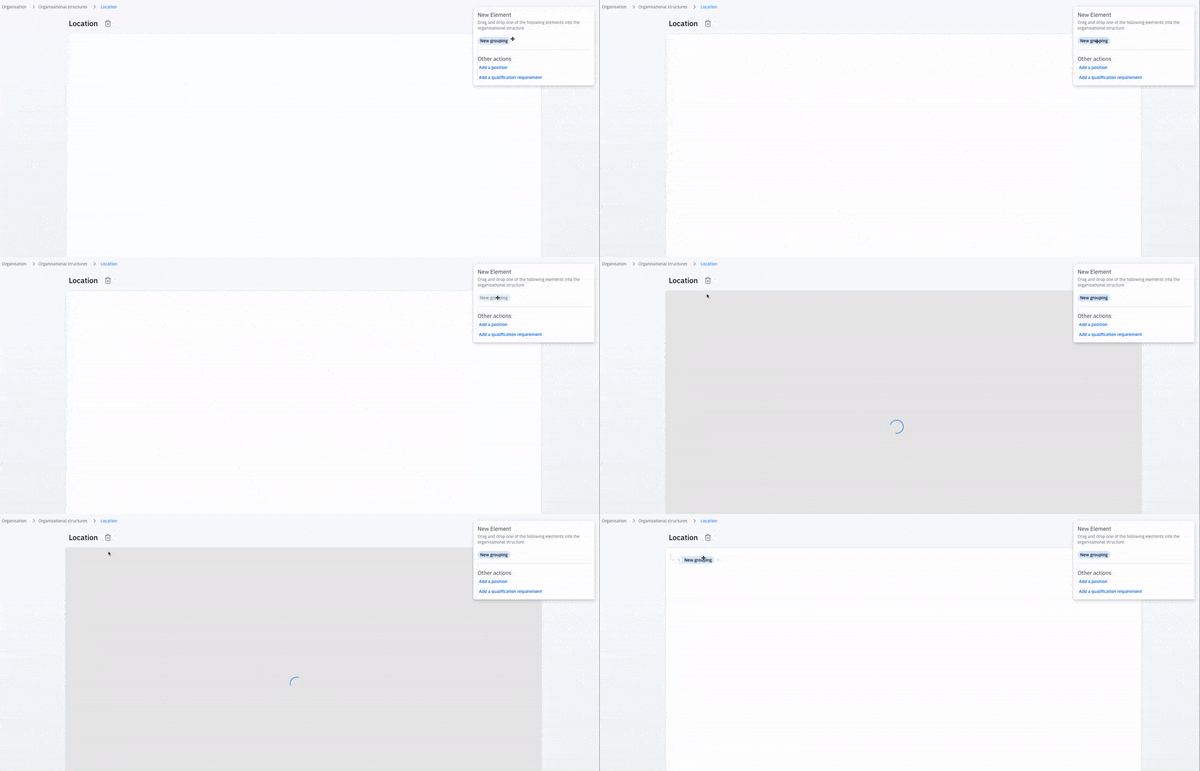
1. Under 'New Element' on the right side, click and hold on **New grouping** to drag & drop it into our structure:
1. In this example, this top grouping is where we will attach our locations, so we will name it "Locations". Then, we will add our first location, because we might want to add requirements that are location specific, or may want to have a matrix in the future that shows us information based on these locations. To edit a grouping, click on it and then the 'Edit' button in the right hand details pane:\
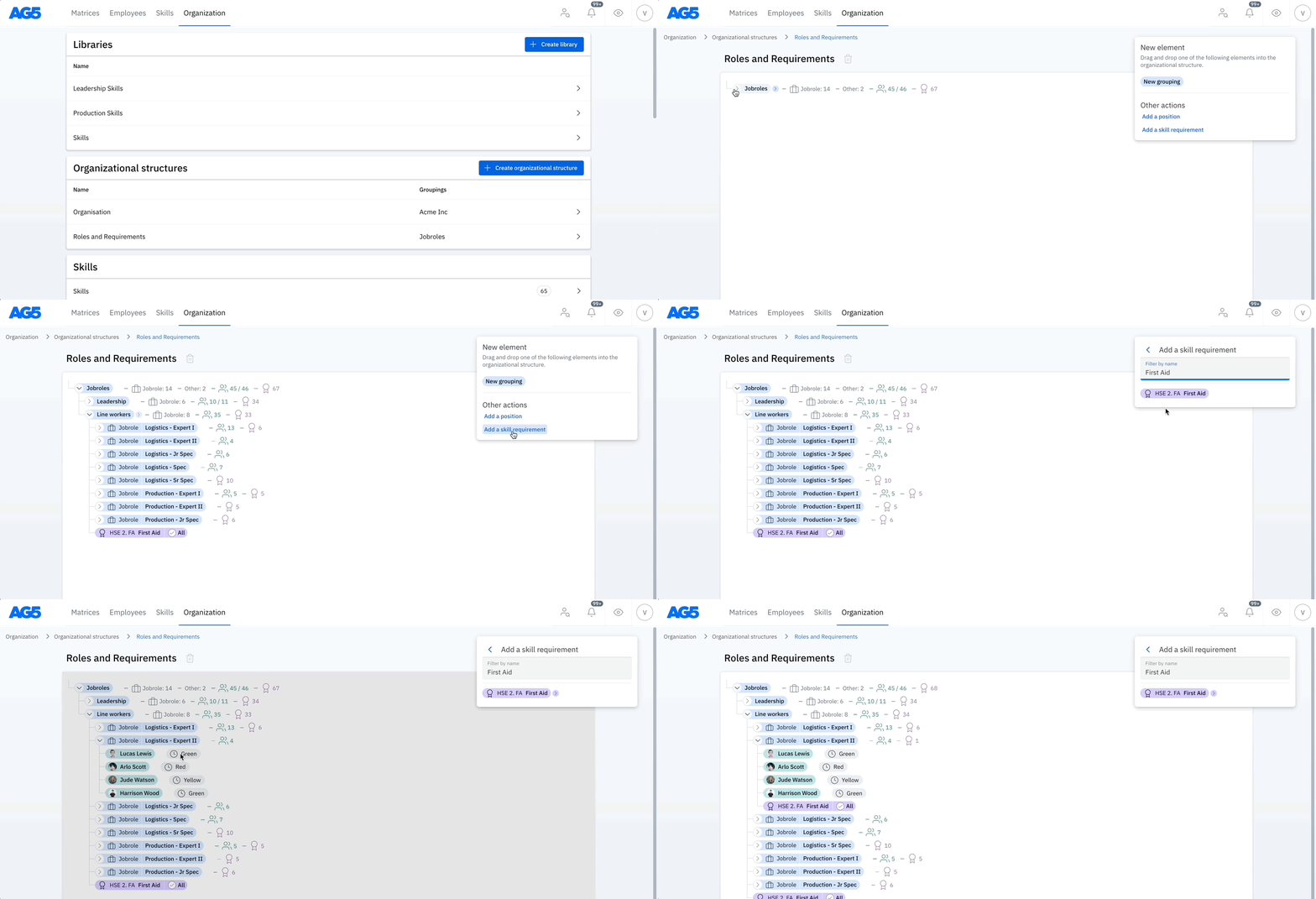
Below, we can see a more complete structure with different regions. We will add a language requirement to Germany and France. Simply click on the button to add a skill requirement and drag and drop it into the relevant grouping.
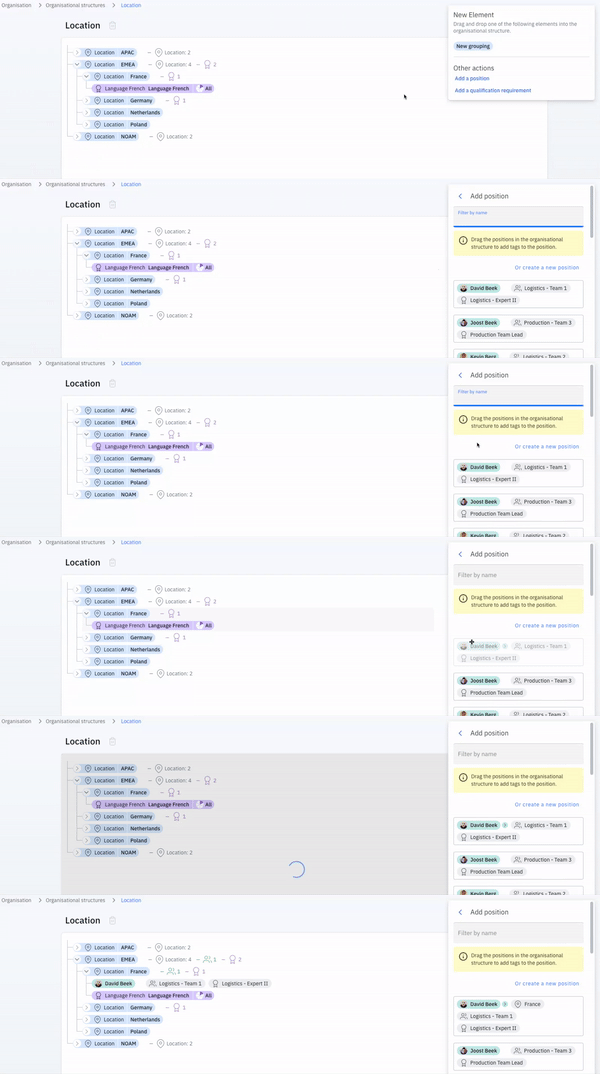
In the next clip we will add an employee to our location in France. We click on “Add a position” and then drag & drop the employee to France. This means he now has a requirement for the skill French, because he is part of that specific org structure.
For more information about creating positions for employees, see [this article ](/employees/employee-position.md)working with employee positions.
### 3. Best practices
#### **Nested structure?**
We generally recommend keeping the org structure as flat as possible, so it doesn’t get too convoluted and keeps the matrices easy to read. However, it is possible to create a combination and add sub-groupings. For example “Departments & Job roles”, “Locations & Departments,” or whatever works best for you.
#### **Removing employees**
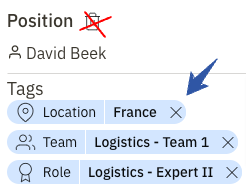
If you want to remove an employee from an org structure, you can simply drag & drop the employee to a different group (for example if they move departments) or click on the employee and remove that specific tag. Do not click on the trash bin, because that would remove all the tags. In our example picture you can click on the X next to France, to remove the employee from the location in France.
### **Duplication**
We strongly advise against any kind of duplication. For example, using a job title grouping like "Intern" across different departments. Instead, we advise making them different, such as "Marketing Intern", "Sales Intern", and "Logistics Intern", for example.
{% hint style="info" %}
We understand that setting up a new organizational structure for the first time or reworking it because of new business processes can seem challenging. If you have questions or want to discuss your goal(s) when setting up a new organizational structure, you can always reach out to or speak with your customer success manager.
{% endhint %}
---
# Agent Instructions
This documentation is published with GitBook. GitBook is the documentation platform designed so that both humans and AI agents can read, navigate, and reason over technical content effectively. Learn more at gitbook.com.
## Querying This Documentation
If you need additional information that is not directly available in this page, you can query the documentation dynamically by asking a question.
Perform an HTTP GET request on the current page URL with the `ask` query parameter, and the optional `goal` query parameter:
```
GET https://docs.ag5.com/employees/organizational-structures.md?ask=&goal=
```
`ask` is the immediate question: it should be specific, self-contained, and written in natural language.
`goal` is optional and describes the broader end goal you are ultimately trying to accomplish on behalf of the user. GitBook uses it to tailor the answer towards what is most useful for that goal.
The response will contain a direct answer to the question and relevant excerpts and sources from the documentation.
Use this mechanism when the answer is not explicitly present in the current page, you need clarification or additional context, or you want to retrieve related documentation sections.

 You should now be looking at a blank organizational structure.
For this example, we will create a structure based on site locations.
1. Under 'New Element' on the right side, click and hold on **New grouping** to drag & drop it into our structure:
You should now be looking at a blank organizational structure.
For this example, we will create a structure based on site locations.
1. Under 'New Element' on the right side, click and hold on **New grouping** to drag & drop it into our structure:
 In the next clip we will add an employee to our location in France. We click on “Add a position” and then drag & drop the employee to France. This means he now has a requirement for the skill French, because he is part of that specific org structure.
 For more information about creating positions for employees, see [this article ](/employees/employee-position.md)working with employee positions.
### 3. Best practices
#### **Nested structure?**
We generally recommend keeping the org structure as flat as possible, so it doesn’t get too convoluted and keeps the matrices easy to read. However, it is possible to create a combination and add sub-groupings. For example “Departments & Job roles”, “Locations & Departments,” or whatever works best for you.
#### **Removing employees**
If you want to remove an employee from an org structure, you can simply drag & drop the employee to a different group (for example if they move departments) or click on the employee and remove that specific tag. Do not click on the trash bin, because that would remove all the tags. In our example picture you can click on the X next to France, to remove the employee from the location in France.
For more information about creating positions for employees, see [this article ](/employees/employee-position.md)working with employee positions.
### 3. Best practices
#### **Nested structure?**
We generally recommend keeping the org structure as flat as possible, so it doesn’t get too convoluted and keeps the matrices easy to read. However, it is possible to create a combination and add sub-groupings. For example “Departments & Job roles”, “Locations & Departments,” or whatever works best for you.
#### **Removing employees**
If you want to remove an employee from an org structure, you can simply drag & drop the employee to a different group (for example if they move departments) or click on the employee and remove that specific tag. Do not click on the trash bin, because that would remove all the tags. In our example picture you can click on the X next to France, to remove the employee from the location in France.
 ### **Duplication**
We strongly advise against any kind of duplication. For example, using a job title grouping like "Intern" across different departments. Instead, we advise making them different, such as "Marketing Intern", "Sales Intern", and "Logistics Intern", for example.
{% hint style="info" %}
We understand that setting up a new organizational structure for the first time or reworking it because of new business processes can seem challenging. If you have questions or want to discuss your goal(s) when setting up a new organizational structure, you can always reach out to
### **Duplication**
We strongly advise against any kind of duplication. For example, using a job title grouping like "Intern" across different departments. Instead, we advise making them different, such as "Marketing Intern", "Sales Intern", and "Logistics Intern", for example.
{% hint style="info" %}
We understand that setting up a new organizational structure for the first time or reworking it because of new business processes can seem challenging. If you have questions or want to discuss your goal(s) when setting up a new organizational structure, you can always reach out to